
Intro to CNN
Introduction
Convolutional Neural Networks, the three words together sounds like a weird combination of biology and math with a little flavor of computer science sprinkled in, but these networks have been some of the most influential inventions in the field of Computer Vision. The year 2012 was the first year that neural nets grew to prominence. Alex Krizhevsky used them to win that year’s ImageNet competition (the annual Olympics of computer vision in simple terms), dropping the classification error record from 26% to 15%, an astounding improvement at the time. Ever since, a plethora of companies have been using deep learning at the core of their services. The classic, and arguably most popular, use case of these networks is for image processing. Within image processing, let’s take a look at how to use these CNNs for image classification.
The Problem Space
Image classification is the task of taking an input image and outputting a class (cat, dog, etc.) or a probability of classes that best describe the image. For humans, this task of recognition is one of the first skills that we acquire from the moment we are born and is something that comes as adults naturally and without effort. Without even thinking twice, we’re able to identify the environment we’re in, quickly and seamlessly. When we see an image or just look at the world around us, most of the time we can immediately characterize the scene and give each object a label, all without even noticing it consciously. These skills of being able to recognize patterns quickly, generalize from previous knowledge, and adapt to various image environments are those we do not share with our fellow machines.
Inputs and Outputs to the network
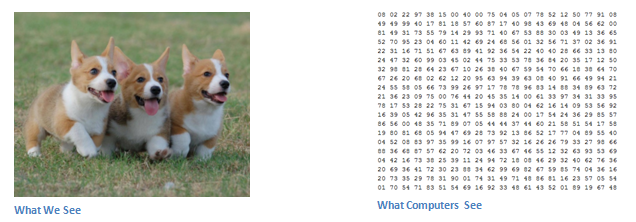
When a computer views an image (takes an image as input), an array of pixel values will appear. Depending on the image resolution and size, an array of numbers 32 x 32 x 3 (the 3 refers to RGB values) will appear. Just to drive the point home, let’s say we have a JPG-form color image and its size is 480 x 480. The representational array is set to be 480 x 480 x 3. Each of these numbers is given a value from 0 to 255 that describes the intensity of the pixels at that point. These numbers are the only inputs available to the computer, though they are meaningless to us when we perform image classification. The idea is to give this array of numbers to the computer and output numbers will describe the likelihood of the image being a certain class (.70 for cat,.25 for dog,.05 for bird, etc.).
What We Want our Computer to Do
Now that we know the issue and the inputs and outputs, let’s think about how to approach it. What we want the computer to do is to be able to distinguish between all the images it is given and to figure out the unique characteristics that make a dog, a dog or cat, a cat. That is the process that also goes on subconsciously in our minds. Looking at a dog’s picture we can classify it as such if the picture has identifiable features like paws or 4 legs. Similarly, by searching for low-level features such as edges and curves, the computer is able to perform image classification, and then build up to more abstract concepts through a series of convolutional layers. This was a general overview of what CNN does. Now, let’s get into the specifics.
Biological Connection
But first, let’s take some history lessons. It’s not going to be boring at all, I promise. You may have been thinking about something related to neuroscience or biology when you first heard of the term Convolutional Neural Networks, and guess what? You would be right. CNNs borrow their structural construct from the visual cortex which we would call as an inspiration coming from biology. The visual cortex has tiny regions of cells that are sensitive to specific visual field regions. A fascinating experiment by Hubel and Wiesel in 1962 (Video) expanded this idea, where they showed that some individual neuronal cells in the brain responded (or fired) only in the presence of edges of a certain orientation. Hubel and Wiesel found that all of these neurons were arranged in a columnar architecture and were able to generate visual perception together. This concept of specialized components inside a system with different tasks (neuronal cells in the visual cortex looking for similar characteristics) is often used by machines and is the basis behind CNNs.
Structure
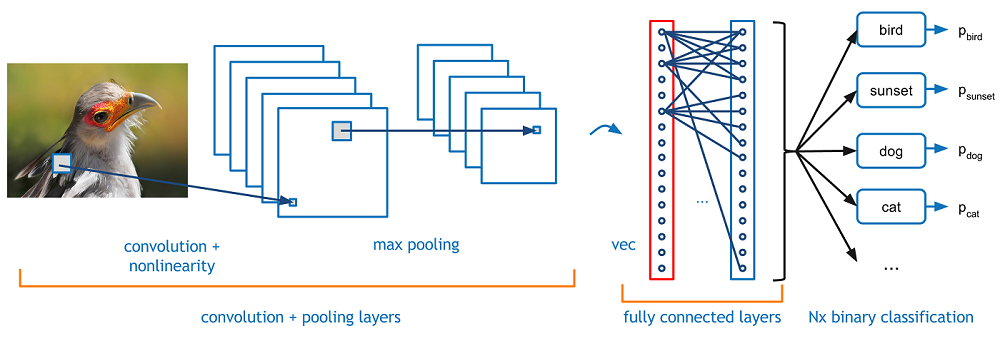
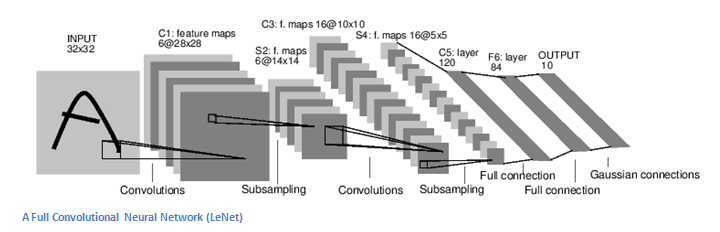
Back to the particulars. A more detailed overview of what CNNs are doing would be taking the image, passing it through a series of convs, nonlinear, pooling (downsampling), and fully connected layers, and getting an output. As we said earlier, the output can be either a single class, or a class probability that best describes the image. The hard part now is the understanding of what each of these layers is doing. So let’s start with the most significant one.
First Layer – Math Part
In a CNN the first layer is always a Convolutional layer. First thing to make sure is that you remember what the layer of input to this conv (I will use that abbreviation a lot) is. As we already mentioned, the input is a pixel value array of 32 x 32 x 3. Now, the best way to explain a conv layer is to imagine a flashlight that shines above the image at the top left. Let’s say the light which this flashlight shines covers an area of 5 x 5. And now, let’s imagine this sliding flashlight across all areas of the input image. In terms of machine learning, this flashlight is called a filter (or sometimes referred to as a neuron or kernel), and the region it shines over, is called the receptive field. Now this filter is an array of numbers as well (these numbers are called weights or parameters). A very important note is that the depth of this filter must be the same as the depth of the input (this ensures the math works out), so this filter’s dimensions are 5 x 5 x 3. Now let’s take, for example, the first position the filter is in. That would be the left corner at the top. Since the filter slides over the input image, the values in the filter are multiplied by the original pixel values of the image (aka computing element wise multiplications). These multiplications are all summed up (in mathematical terms, that would be a total of 75 multiplications). So, you got a single number now. Remember, that number only represents when the filter is at the top left of the image. Now, for every location on the volume of input we repeat this process. (The next step would be to move the filter in 1 unit to the right, then in 1 again to the right and so on). Every single location produces a number on the input volume. After sliding the filter across all the locations, you’ll find out that what you’re left with is, an array of 28 x 28 x 1 that we call an activation map or feature map. The reason you get a 28 x 28 array is that a 5 x 5 filter can fit on a 32 x 32 input image with 784 different locations. Those 784 numbers are mapped to an array of 28 x 28.
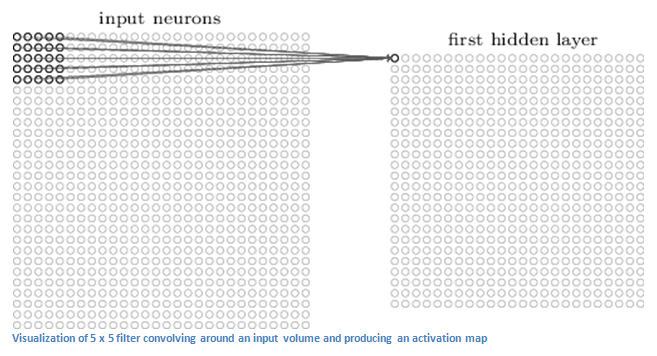
(Quick Note: Some of the images, including the one above I used, came from this awesome book, Michael Nielsen’s “Neural Networks and Deep Learning.” Strongly recommended by the way.) Let’s say now that we’re using two 5 x 5 x 3 filters instead of one. Our volume of output would then be 28 x 28 x 2. We are able to preserve the spatial dimensions better by using more filters. This is mathematically what happens in a convolutional layer.
First Layer – High Level Perspective
Let’s talk about what this convolution actually does on a high level. One can think of each of these filters as feature identifiers. I’m talking about things like straight edges, simple colours, and curves when I say features. Think about the simplest features all the images have in common. Let’s say that our first filter is 7 x 7 x 3, and will be a detector of curves. (In this section, let’s overlook the fact that the filter is 3 units deep and only consider the filter’s top depth slice and the image, for simplicity.) The filter will have a pixel structure as a curve detector in which there will be higher numerical values along the area that is a curve shape.
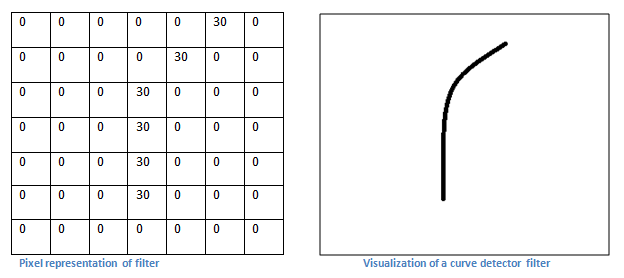
Now let’s get back to mathematically visualizing this. When we have this filter at the top left corner of the input volume, multiplications are computed between the values of the filter and the pixel in that region. Now let’s take an example of an image we’d like to classify, and put our filter in the top left corner.
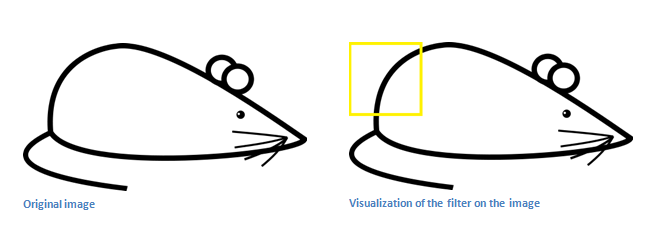
Remember, what we need to do is multiply the values in the filter by the image’s original pixel values.
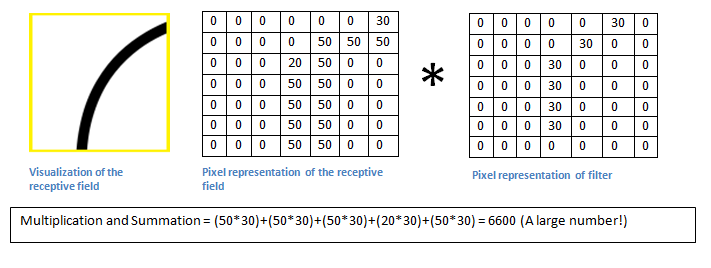
Basically, if there is a shape in the input image that generally resembles the curve this filter represents, then all of the multiplications summed up together will result in a large value! Now let’s see what happens with our filter when it moves.
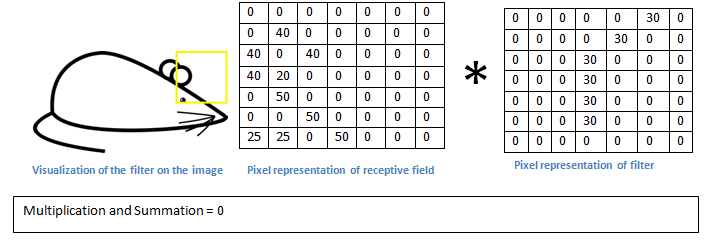
The value is a lot smaller! This is because the image section contained nothing that responded to the curve detector filter. Remember, an activation map is the output of this conv layer. So, in the simple case of a one-filter convolution (and if that filter is a curve detector), the activation map shows the areas where curves in the picture are most likely to occur. In this example the top left of our activation map 26 x 26 x 1 (26 due to the 7x7 filter instead of 5x5) will be 6600. This high value means that there is probably some kind of curve in the volume of the input which caused the filter to activate. In our activation map, the top right value will be 0 because there was nothing in the input volume that caused the filter to activate (or, more simply, there was no curve in that area of the original image). Remember, this is for one filter only. This is just a filter that will detect lines curving outwards and to the right. For lines curving to the left or for straight edges we may have other filters. The more filters, the greater the activation map depth and the more information we have about the volume of inputs.
Disclaimer: The filter I described in this section was simplistic to describe the math that is going on during a convolution. In the image below, you will see some examples of actual visualizations of the filters of a trained network’s first conv layer. The main argument remains the same, nonetheless. The filters on the first layer converge around the input image and “activate” (or calculate high values) when input volume is the specific feature it is looking for.
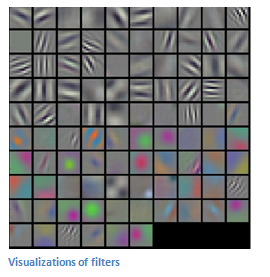
(Quick Note: The above image was taken from Stanford’s CS 231N course taught by Andrej Karpathy and Justin Johnson. Recommend to anyone seeking a deeper understanding of CNNs.)
Going Deeper Through the Network
Now, there are other layers in a traditional convolutionary neural network architecture that are interspersed between these layers. I would strongly encourage those interested to read about them and understand their function and effects, but in general, they do provide nonlinearities and dimensional preservation that help improve network robustness and control overfitting. So would look like a classic CNN architecture.

However, the last layer is an important one which we will go into later. Just take a step back and review what we have learned up to now. We have talked about what the filters are designed to detect in the first conv layer. They detect features of low levels, such as edges and curves. As one would imagine, we need the network to be able to recognize higher-level features such as hands or paws or ears to predict whether an image is a type of object. So let’s ponder what the network output is after the first conv layer. It would be a volume of 28 x 28 x 3 (assuming we will use three 5 x 5 x 3 filters). The output of the first conver layer becomes the input of the 2nd conv layer when we go through another conv layer. Now, that’s a bit more difficult to visualize. When we spoke of the first layer, the input was simply the original image.When we talk about the 2nd conv layer, though, the input is the activation map(s) that result from the first layer. Thus each input layer basically describes the locations in the original image for which certain features of the low level appear. Now, if you apply a set of filters on top of that (pass it through the 2nd conv layer), the output will be activations representing features of higher levels. Types of these features might be semicircles (combining a curve and a straight edge) or squares (combining several straight edges). As you pass through the network and more conv layers, you get activation maps that represent increasingly complex features. You may have some filters at the end of the network that activate when handwriting occurs in the image, filters that activate when viewing pink objects etc. If you want more information about filter visualization in ConvNets, Matt Zeiler and Rob Fergus had an excellent research paper on the topic. Jason Yosinski also has a YouTube video which gives a great visual representation.Another interesting thing to note is that as you go deeper into the network, the filters start to have a larger and larger receptive field which means they can consider information from a larger area of the original input volume (another way to put it is that they are more responsive to a larger area of pixel space).
Fully Connected Layer
Now that we can detect these high-level features, a fully connected layer is attached to the network end by the icing on the cake. This layer basically takes an input volume (whatever the output is of the preceding conv or ReLU or pool layer) and outputs a N dimensional vector where N is the number of classes from which the program must choose. For example, if you wanted a program for digit classification, N would be 10, because there are 10 digits. Each number in this N dimension vector represents the likelihood of some class. For example, if the resulting vector for a digit classification program is [0 .1.1.75.0 0 0 0 0 0.05], then this represents a 10 percent probability of the image being a 1, a 10 percent probability of the image being a 2, a 75 percent probability of the image being a 3, and a 5 percent probability of the image being a 9 (Side note: there are other ways you can represent the output, but I’m a 3) The way this fully connected layer works is by looking at the output of the previous layer (which, as we remember, should represent the high-level activation maps) and determining which features are most correlated to a particular class.For example, if the program predicts that some image is a dog, the activation maps will have high values that represent high-level features like a paw or 4 legs etc. Similarly, if the program predicts that some image is a bird, the activation maps will contain high values that represent high-level features like wings or a beak, etc. Basically, an FC layer looks at what high-level features most closely correlate with a particular class and has particular weights so you get the right probabilities for the different classes when you calculate the products between the weights and the previous layer.
Training (AKA:What Makes this Stuff Work)
Now, this is the one aspect of the neural networks that I have not yet deliberately mentioned and that is probably the most important part. You may have had lots of questions while reading. How do the filters know to look for edges and curves in the first conv layer? How does the layer that is fully connected know which activation maps to view? How do the filters know what values to have in every layer? The way the computer can adjust its filter values (or weights) is through a process called backpropagation training.
Before we get into backpropagation, first we have to take a step back and talk about what a neural network needs to work with. Our minds were fresh at the moment we were all born. We didn’t know what it was that cat or dog or bird. In a similar way, the weights or filter values are randomized before the CNN starts. The filters are unfamiliar with looking for edges and curves. In the higher layers the filters don’t know how to look for paws and beaks. However, as we grew older our parents and teachers showed us various images and pictures and gave us a corresponding label. This idea of being given an image and a label is the process of training CNNs undergo. Before we get into it too, let’s just say we have a training set with thousands of pictures of dogs, cats and birds and each of the pictures has a label of what that picture is like. Return to Backprop.
Thus backpropagation can be divided into 4 separate sections, forward pass, loss function, backward pass and weight update. You take a training image during the forward pass which, as we recall, is a 32 x 32 x 3 array of numbers and passes it through the entire network. In our first example of training, since all the weights or filter values have been initialized randomly, the output is likely to be something like [.1.1.1.1.1.1.1.1.1], basically an output that does not give preference to any number in particular.With its current weights, the network is unable to search for those low-level features or is therefore unable to draw any reasonable conclusion as to what the classification might be. This relates to the backpropagation part of loss function. Remember that Training data is what we are using right now. That data has an image as well as a label. For example, let’s say the first training image you input was a 3. The image label would be set to [0 0 0 1 0 0 0 0 0]. A loss function can be defined in many different ways, but MSE (mean squared error) is a common one, which is squared 1⁄2 times (actual-predicted).

Let’s say this value is equal to the variable L. As you can imagine, the loss for the first pair of training images will be extremely high. Now, let’s just think intuitively on this. We want to get to a point where the predicted label (ConvNet output) is the same as the training label (this means our network got its prediction right).We want to minimize the amount of loss we have to get there. Visualizing this as a simple problem of optimization in calculus, we want to find out which inputs (weights in our case) contributed most directly to the network’s loss (or error).
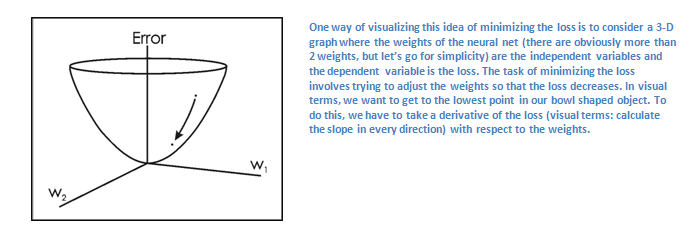
This is the mathematical equivalent of a dL / dW in which W is the weights at a given layer. What we want to do now is to carry out a backward pass through the network, which determines which weights have contributed the most to the loss and find ways to adjust it so that the loss decreases. Once we calculate this derivative, we proceed to the final step, which is the weight update. This is where we take all of the filters’ weights and update them so they change the gradient in the opposite direction.

The learning rate is a parameter selected by the programmer. A high learning rate means that the weight updates take bigger steps and therefore, it may take less time for the model to converge on an optimal set of weights. However, an overly high learning rate could result in jumps that are too large and not accurate enough to reach the optimum point.
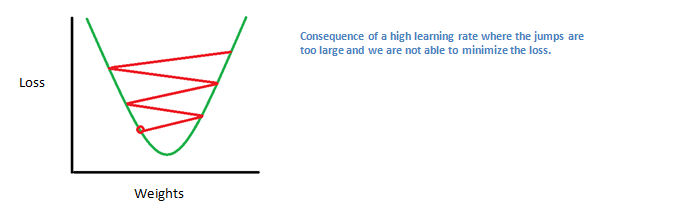
One training iteration is the process of forward pass, loss function, backward passage, and parameter update. For each set of training images the program will repeat this process for a fixed number of iterations (commonly called a batch).Once you finish updating the parameter on the last example of the training, hopefully the network should be trained well enough so that the layers’ weights are correctly tuned.
Testing
Finally, to see if our CNN works or not, we have a different set of images and labels (can’t double dip between training and testing!) and the images are passed through the CNN. We compare the outputs with the reality on the ground and see if our network is working!
How Companies Use CNNs
Data, figures, data. The firms that have lots of that magic 4 letter word are those that have an inherent advantage over the rest of the competition. The more training data you can give to a network, the more training iterations you can make, the more weight updates you can make, and when it goes to production, the better the network tuned. Facebook (and Instagram) can use all the pictures of the billion users it currently has, Pinterest can use information of the 50 billion pins on its website, Google can use search data and Amazon can use data from the millions of products that are purchased daily. And now you are aware of the magic behind how they use it.
Disclaimer: Although this post should be a good beginning to understand CNNs, it is by no means a comprehensive overview. Things that are not discussed in this post include the nonlinear and pooling layers as well as network hyperparameters such as filter sizes, steps, and padding. Topics such as network architecture, batch standardization, fading gradients, dropout, initialization techniques, non-convex optimization, bases, loss function choices, data increase, regulation methods, computational considerations, backpropagation modifications, and more were also not discussed (still).